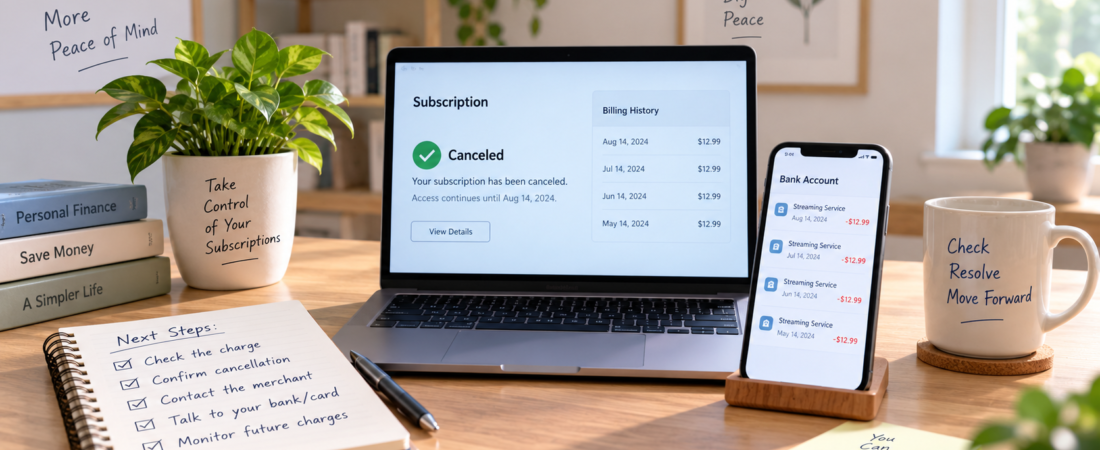
If a subscription keeps charging you after you cancel, act quickly but do not rely on a phone conversation alone. Confirm exactly when and how the subscription was canceled, save evidence, contact the merchant in writing, and monitor the payment account for another charge. If the merchant does not correct the billing, you can ask the card issuer or bank about disputing the transaction.
The right response depends on the details. A charge may have been submitted before the cancellation took effect, the cancellation may have applied only to one service, or the account may have been billed through a different company such as an app store, mobile carrier, or payment platform. The steps below help separate those possibilities and create a useful record.
First, identify what the charge actually is
Start with the transaction on your bank or credit card statement. Write down the merchant name, amount, transaction date, posting date, and payment method. The name shown on the statement may differ from the brand name you remember, especially when a parent company or payment processor handles the billing.
Check whether the charge is truly a recurring subscription payment. Some businesses use similar descriptions for one-time purchases, renewal fees, taxes, add-ons, late charges, or a separate account. If the amount changed, do not assume it is a different merchant; subscriptions sometimes renew at a different rate under their terms. At the same time, an unfamiliar description should not be treated as proof that the charge is valid.
It can help to review your bank statement for recurring charges before contacting the merchant. Look at several months of transactions and compare the dates and amounts. This may reveal whether the charge continued once, repeated several times, or came from another account in the same household.
Confirm where the cancellation had to be completed
Subscriptions are often managed through the company that provides the service, but not always. The correct cancellation location may be:
- The service provider’s website or account settings
- An Apple or Google app-store account
- A mobile-phone or internet provider account
- A payment service account
- A gym, club, insurance, software, or other organization’s member portal
Deleting an app usually does not cancel its subscription. Removing a payment card may also fail to stop billing and can create a declined-payment problem rather than a completed cancellation. Likewise, canceling one subscription may not cancel a related membership, premium feature, family plan, or separate add-on.
Sign in through the account or billing channel that originally created the subscription. Look for a status such as “canceled,” “ends on,” or “expires on.” Save a screenshot that includes the account identifier, cancellation status, and date if those details appear together. If the account says the plan is still active, complete the cancellation and save the new confirmation.
Readers who have not completed the initial cancellation may benefit from guidance on how to cancel unused subscriptions. This article focuses on the different problem that occurs after a cancellation was submitted or confirmed.
Check the cancellation date against the charge date
Compare the cancellation confirmation with the billing timeline. A subscription can remain available until the end of a prepaid billing period even after auto-renewal has been turned off. In that situation, access continuing for a limited period does not necessarily mean another renewal was authorized.
For example, suppose a monthly plan renews on the 15th, and the customer cancels on the 10th. A charge posted on the 15th may indicate that the cancellation did not take effect, while a charge posted on the 9th might have been submitted before the cancellation. The transaction date, posting date, and statement date may be different. Save the exact dates and labels shown by the merchant and your financial institution rather than assuming that one date controls every dispute deadline.
Also check the subscription’s stated renewal time zone and the account’s cancellation terms. A cancellation submitted late on a renewal date may be processed after the next billing event. Do not assume that a merchant’s policy automatically resolves the issue, but use the policy and timestamps to explain what happened clearly.
When the timing is disputed, put the key events into one chronological table instead of comparing dates from memory. Record the renewal date and time, cancellation request date and time, cancellation effective date shown by the merchant, transaction date, posting date, and any refund date. Also note the time zone when it matters. This can reveal whether the charge was initiated before cancellation, whether the merchant treated cancellation as effective at the end of a billing period, or whether a new charge was created after the account should have stopped renewing.
Gather evidence before requesting a correction
A strong record makes it easier for the merchant, card issuer, or bank to understand the dispute. Keep copies of:
- The original subscription receipt or welcome email
- The cancellation confirmation, ticket number, or screen showing the canceled status
- Emails, chat messages, and support case numbers
- Statements showing the charge, including the transaction date and amount
- The subscription terms or cancellation language that applied when you signed up
- Any message showing that the merchant approved a refund or future billing stop
Save the files in a place you can access later. Screenshots should show enough surrounding information to establish which account or service they relate to. If a confirmation is available only inside an account, download it or take a screenshot before the page changes.
Keep a simple timeline with dates and actions. For instance: “March 3—canceled through account settings; March 3—received confirmation email; March 15—renewal charge posted; March 16—requested refund by email.” This is more useful than a general statement that the company “kept charging” you.
If more than one post-cancellation charge exists, list each one separately rather than requesting one unspecified refund. For each charge, record the transaction date, posting date, amount, merchant descriptor, billing period if known, and whether you have requested or received a refund. Add the amounts to determine the total still unresolved. For example, if two $14.99 renewals posted after cancellation and neither has been refunded, the unresolved amount is $29.98. If one $14.99 refund later appears, keep the second charge open until it is resolved separately.
Contact the merchant in writing
Use the company’s official support channel, billing email, or secure account message system. If you call, ask the representative to document the issue and send a follow-up message summarizing the conversation. Written communication gives you a record of the request and reduces confusion about the date, amount, and desired resolution.
Keep the message factual and specific. Include the account email or customer number if appropriate, but do not send a full card number. Provide only the last four digits when the merchant needs to identify the payment method.
A practical message might say:
“I canceled my subscription on [date], and I received confirmation that it would not renew. A charge of [$amount] appeared on [transaction date]. Please confirm that the subscription is canceled, stop any future recurring billing, and refund this charge. The cancellation confirmation and transaction details are attached.”
Ask for three separate answers: whether the subscription is canceled, whether any other related plan remains active, and whether the specific charge will be refunded. A response that says only “your account is closed” may not resolve a charge that has already been processed.
Follow up if the company says the charge is valid
Ask the merchant to explain the billing timeline and identify the cancellation date recorded in its system. Request the applicable renewal date, the reason the payment was taken, and the company’s refund decision in writing. You do not need to argue about every term; focus on whether the cancellation occurred before the renewal and whether the company can match its records to the transaction.
Check whether the company is treating your request as a cancellation only, rather than a refund request. State plainly that you are requesting a refund for the charge dated [date] and that you want confirmation that future recurring billing has stopped.
If the first representative cannot resolve it, ask for the billing or retention team and keep the existing case number. Avoid opening many separate cases if doing so will scatter the record. A concise follow-up can quote the original request and attach the cancellation evidence again.
Ask your bank or card issuer about the charge
If the merchant does not correct the charge, contact the financial institution that processed the payment. The process differs for credit cards, debit cards, bank-account debits, and digital wallets, so ask which dispute category fits the facts. Explain that the payment concerns a subscription canceled on a particular date and provide the supporting documents.
Use accurate wording. If you authorized the original subscription but believe a later payment was taken after cancellation, say that clearly. Do not describe it as an entirely unknown transaction if you recognize the merchant. Misclassifying the charge can complicate the review.
Ask the issuer or bank:
- What deadline applies to disputing this transaction?
- Which documents should be submitted?
- Can the institution place a stop on future recurring payments from this merchant?
- Does stopping the payment affect the underlying contract or account?
- How will the dispute status and temporary credits, if any, be communicated?
Stopping a recurring payment through a bank or card issuer may prevent a particular payment method from being charged, but it does not necessarily cancel the subscription agreement. Complete the merchant cancellation separately and retain proof. If the merchant tries another payment method already stored on the account, report that fact to the issuer or bank.
Keep the dispute over past charges separate from the request to prevent future payments. A bank may need different instructions or documentation for an already-posted transaction and for a future recurring debit. Write down which completed charges you are asking the institution to investigate and separately ask what action, if any, is available to stop another scheduled payment. After any block or stop-payment request is placed, record its effective date, duration, confirmation number, and any conditions the institution gives you.
Deadlines and procedures can vary by payment type and institution. The instructions supplied with the statement, card agreement, bank account agreement, or dispute form should control the next step.
For credit-card billing errors, federal protections can involve sending a written billing-error notice within 60 days after the issuer sent the first statement showing the error. For certain preauthorized electronic debits from a bank account, federal rules also provide a stop-payment process when the bank receives notice at least three business days before the scheduled transfer. These rules do not apply identically to every subscription payment, so follow the current instructions from your card issuer or bank for the payment method involved.
Replace a card only when it fits the situation
Replacing a card may be appropriate when the card is lost, stolen, or exposed to unauthorized use, but it is not a complete solution to a subscription dispute. Some recurring merchants may receive updated payment information through account-update services, and a replacement does not erase the cancellation record you need.
Ask the issuer what options, if any, are available for preventing additional recurring charges from that merchant. If the payment is coming from a bank account, ask about the procedure for stopping an electronic debit. Get confirmation of any block and learn how long it applies.
Do not close a bank account or take other drastic action solely because one subscription charge is disputed without understanding the consequences. Automatic bills, deposits, and legitimate payments may also be affected.
Watch for related accounts and alternate billing channels
Continued billing sometimes occurs because the canceled account was not the account that generated the charge. Check household email addresses, work accounts, family profiles, and phone numbers associated with the service. Search email for receipts using the merchant name, “renewal,” “invoice,” or “subscription.”
Review app-store subscriptions separately from direct subscriptions. A company may be unable to cancel a subscription purchased through an app store, while the app store may not be able to refund a direct website purchase. The transaction descriptor and original receipt can indicate which party should handle the request.
Also look for bundled services. A streaming package, software suite, membership, or mobile plan may contain multiple products with separate renewal schedules. Canceling one component may leave another active, particularly when the account page displays several services together.
What to do if another charge appears
If a new charge posts after you received confirmation that billing stopped, update the existing merchant case rather than starting from scratch. State that the charge occurred after the cancellation confirmation and attach the new statement entry. Then contact the financial institution promptly and ask whether the new transaction must be disputed separately.
Continue monitoring the account for at least one or two expected billing cycles, depending on the subscription’s schedule. Record any attempted, reversed, pending, or completed payments. A pending authorization is not always a final charge, but it is worth watching until it disappears or posts.
If another completed charge appears, compare it with the earlier disputed transactions before contacting support again. Check whether the merchant descriptor, amount, billing channel, and payment method are the same. If they differ, investigate whether a second subscription, add-on, app-store billing arrangement, or alternate stored payment method is involved. If they match, add the new transaction to the existing timeline and identify it as a separate post-cancellation charge so the merchant and financial institution can see that the billing continued after the earlier complaint.
Once the account is resolved, remove saved payment details only if the service allows it and doing so will not interfere with a pending refund. Save the final cancellation and refund communications before closing the account.
Refunds, credits, and reversals are not the same
A merchant may offer a refund to the original payment method, an account credit, or a reversal of a pending authorization. These outcomes affect your money differently. A credit that can be used only for future service may not solve a charge dispute if you no longer want the subscription.
Ask which transaction is being refunded, the amount, the payment method, and the expected processing timeframe. Keep the merchant’s confirmation. A refund can take time to appear after the merchant submits it, and the way it appears on a statement may differ from the original charge.
If the merchant says a refund was issued but it has not appeared, compare the confirmation date and refund reference with your account activity. Then ask the merchant or payment processor to trace it. Your bank or card issuer may also be able to search using the refund details. Do not assume that a promise of a refund means the money has already reached your account.
Common mistakes that make the problem harder
- Deleting the app instead of canceling: Removing software from a device usually does not change the billing status.
- Waiting several months: Delay can make the timeline harder to reconstruct and may affect dispute deadlines.
- Relying only on a phone call: Without a case number or written follow-up, it may be difficult to show what was requested.
- Disputing the wrong transaction: Identify the exact charge, date, amount, and merchant descriptor.
- Assuming a new card ends the subscription: Payment updates or alternate billing methods may allow another attempt.
- Confusing a refund with cancellation: Stopping future renewals does not automatically return a charge that already posted.
- Ignoring a bundled plan: A canceled add-on may not be the same as the primary membership.
A concise action checklist
- Identify the merchant, amount, transaction date, and payment method.
- Confirm where the subscription was purchased and complete cancellation there.
- Save the cancellation confirmation and build a dated timeline.
- Check whether the charge occurred before or after cancellation took effect.
- Contact the merchant in writing and request both a billing stop and a refund when appropriate.
- Record the case number, representative’s response, and any refund reference.
- Ask the bank, card issuer, or payment provider about a dispute and future recurring-payment block.
- Monitor the account for additional charges and document anything that appears.
When the issue is finally resolved
Keep the cancellation confirmation, refund record, and final statement entry together until the account is settled. If the merchant confirms that no balance remains and no future payments are scheduled, save that message as well.
The central goal is to resolve two separate issues: stopping future billing and addressing the charge that already occurred. Treating them separately, using precise dates, and preserving the evidence gives the merchant and payment provider the clearest basis for correcting the problem.
Disclaimer
This article is for general informational purposes only and is not financial, tax, legal, or investment advice. Rules, rates, eligibility, and financial outcomes can vary by person and location. Verify current information with official sources and consult a qualified professional for guidance about your specific situation.
Leave a Reply